Refresh Data in Excel
After you've successfully retrieved data from your connected data sources, you may want to update it periodically to reflect the latest performance metrics.
Important: Unlike our Google Sheets add-on, automatic scheduled refreshes currently are not available in the Excel add-in due to Excel’s offline-first nature. You can refresh your data manually at any time.
Manual Refresh
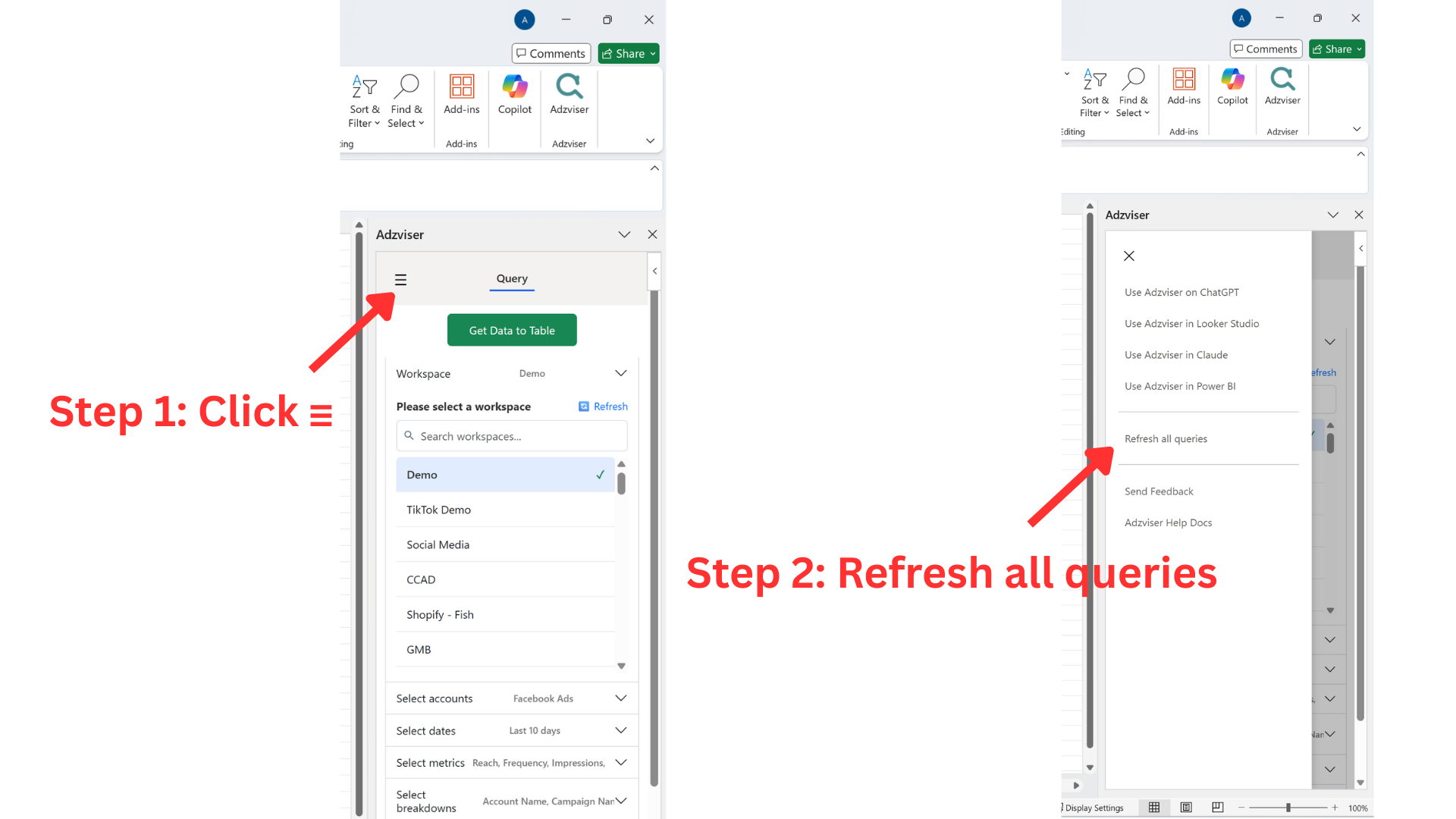
To refresh your data in Excel:
- Open the Adzviser task pane by clicking the Adzviser button in your Excel ribbon
- Click ☰ on the top left corner
- Click the "Refresh all queries" button
Adzviser will re-fetch the data using your previously saved query parameters (workspace, accounts, metrics, breakdowns, and date range) saved in the hidden adzviserQuery worksheet and update the cells in your Excel worksheet.
Using Predefined Date Ranges for Easy Refresh
When you use predefined date ranges like "Last X days" or "This month", refreshing becomes particularly powerful:
- Each refresh will automatically calculate the new date range based on the current date
- Your reports stay up-to-date without needing to manually adjust dates
Available Predefined Date Ranges
today- Current dayyesterday- Previous daylastWeek- Last full week (7 days)monthToDate- From the 1st of the current month to todaymonthToYesterday- From the 1st of the current month to yesterdaylastMonth- Previous calendar monthyearToDate- January 1st to todayyearToYesterday- January 1st to yesterdaylastYear- Previous calendar yearlastXDays- Last X days (e.g., last7Days, last14Days, last30Days)lastXWeeks- Last X weeks (e.g., last4Weeks, last8Weeks)lastXMonths- Last X months (e.g., last3Months, last6Months, last12Months)prevPeriod- Same length period immediately before selected rangesameDatesOneYearAgo- Same dates from one year ago
Need Automatic Refreshes?
If automatic scheduled refreshes are critical for your workflow, we recommend:
- Google Sheets add-on: Supports automatic scheduled refreshes directly within the add-on