Usage metrics and monthly active rows
To check your usage, open Adzviser's Set Up page, open the account menu at the top right, and select Usage metrics. Check the account name in the panel: its activity includes team members using that account. Use Switch account if you are viewing a different account.
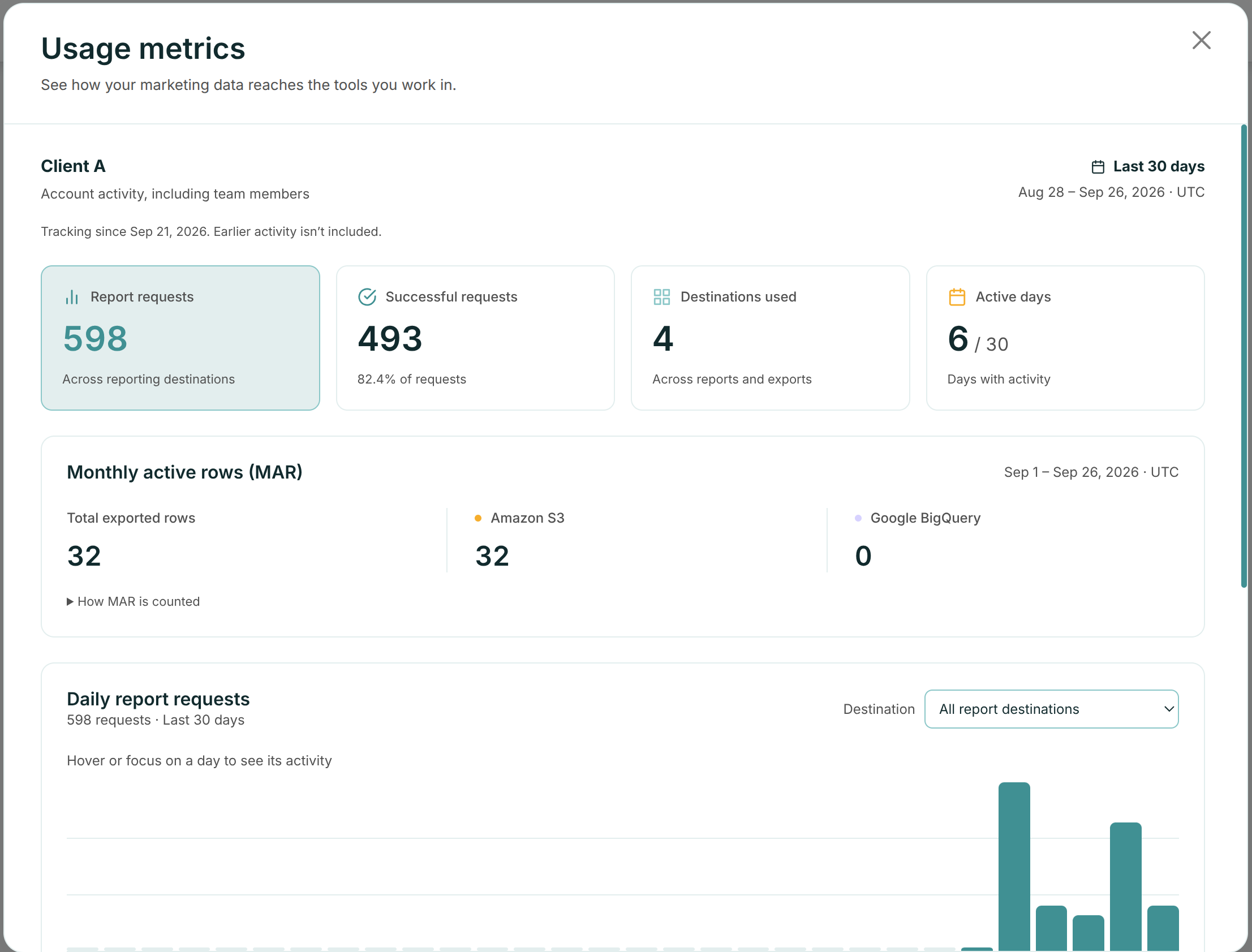
Read your usage
| Metric | What it shows |
|---|---|
| Report requests | Reporting requests recorded over the last 30 days. This is an activity count, not the number of rows exported. |
| Successful requests | Requests that completed successfully, with their share of all recorded report requests. |
| Destinations used | Destinations with activity across reports and warehouse exports. |
| Active days | Days with activity during the last 30 days. |
| Monthly active rows (MAR) | Data rows exported to Amazon S3 and Google BigQuery during the current UTC calendar month. |
The report activity window and the MAR window are different. The panel shows their dates. Use the Destination selector to inspect daily report requests or daily warehouse rows. If you see Tracking since, earlier activity is not included in the displayed history.
How MAR is counted
In Monthly active rows (MAR), check Total exported rows and the separate Amazon S3 and Google BigQuery totals. Expand How MAR is counted for the counting rules and next month's start date.
- Successfully exported data rows count toward MAR. Header rows and unsuccessful writes do not count.
- Exporting the same rows again counts again, including a backfill or a scheduled run that replaces existing data. MAR is not a count of distinct records stored in your destination.
- Both destinations and all export pipelines on the account share its monthly row capacity.
- A run that fails after some writes have succeeded can still contribute the rows it successfully exported.
- Usage is assigned to the UTC month when the export completes. A new monthly period begins at the start of the next calendar month.
The MAR panel shows usage, not your remaining allowance. It does not display the plan limit or rows reserved by exports still running. Your available capacity can therefore be lower than the displayed exported total alone suggests.
MAR applies to warehouse exports. The Power BI request count and other reporting counts in this panel are activity metrics; this warehouse allowance does not establish a limit on those query counts.
Monthly capacity and your plan
The warehouse row allowance depends on the account's subscription. Warehouse access and sufficient monthly capacity are both required for an export. A connected S3 bucket or BigQuery project does not, by itself, guarantee that an export can run.
Open Subscription info from the account menu on Set Up to review the account's subscription. If you need to confirm its MAR allowance or arrange more capacity, contact Adzviser. Do not infer your allowance from the report-request count or from another account's plan.
Before writing data, an export reserves capacity for the rows it is about to export. That capacity stays reserved while the run is in progress. Once the run finishes, the reservation is released and successfully exported rows count as usage. Unfinished reservations can carry across the monthly reset.
If an export is blocked
Check Export History for the failed run and its message, then check Usage metrics for the same account.
| Message or situation | What to do |
|---|---|
| “Monthly row capacity is currently used or reserved by exports in progress.” | Wait for running exports to finish, then check their results and retry. Completed exports may consume the reserved capacity, so waiting does not guarantee that enough will become available. |
| “Export requires … rows but there is not enough monthly row capacity” | Reduce the date range or reporting detail to reduce the row count, or wait until capacity is available. Splitting a backfill does not increase the account's total monthly allowance. |
| “MAR limit exceeded for your current subscription plan.” | Review the account's subscription and this month's MAR. Wait for the next monthly period or contact Adzviser about the allowance and available plan options. |
| A connection or permissions error | Follow the source or destination's setup/troubleshooting guide. Retrying a capacity error will not repair credentials, and reconnecting credentials will not add row capacity. |
Both Run Once backfills and scheduled exports use the same monthly capacity. Before retrying a partially completed run, review what was exported: exporting those rows again counts again.
If usage or the subscription looks wrong
- Wrong account: check the name at the top of Usage metrics and switch accounts. Shared account activity includes its team members.
- “Not enough data to display yet”: this is a collecting state, not proof that your account has unlimited capacity or no past activity. The dashboard needs an eligible trial/subscription history and recorded activity before it becomes available.
- Usage will not load: use Try again. If it still fails, contact support with the account name and error message.
- A source is unavailable despite a subscription: ask the account owner to check Subscription info and whether the selected source/destination is included or enabled. For an expired connection, renew that source's authorization on Set Up using a source account with the required access. See data source guides and fields.
See the Amazon S3 setup guide or BigQuery setup guide for export-specific steps.